Behind the scenes, Power Platform uses Azure subnet delegation and workload injection:
This ensures that traffic to databases, APIs, and private services stays fully inside the enterprise network boundary.
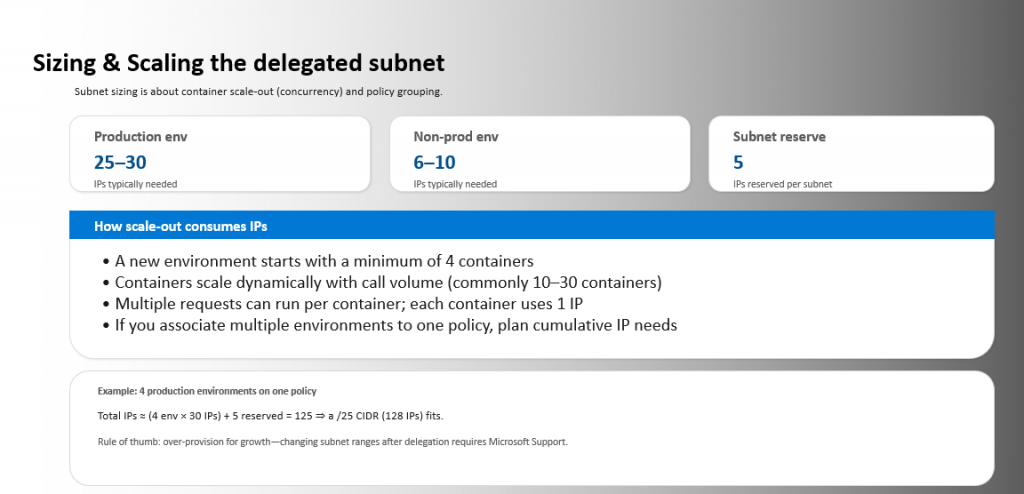
Because containers scale dynamically, subnet sizing must accommodate concurrency:
Over‑provisioning is highly recommended, as changing ranges post‑delegation requires support intervention.
Install-Module Microsoft.PowerPlatform.EnterprisePolicies -Scope CurrentUser -Force
Import-Module Microsoft.PowerPlatform.EnterprisePolicies
$SubscriptionId = "00000000-0000-0000-0000-000000000000"
$ResourceGroup  = "rg-pp-ep-uk"
$VnetNameUKS    = "vnet-pp-uksouth"
$SubnetUKS      = "snet-pp-delegated"
$VnetNameUKW    = "vnet-pp-ukwest"
$SubnetUKW      = "snet-pp-delegated"

$VnetAddrUKS    = "10.10.0.0/16"
$SubnetAddrUKS  = "10.10.1.0/24"
$VnetAddrUKW    = "10.20.0.0/16"
$SubnetAddrUKW  = "10.20.1.0/24"
New-VnetForSubnetDelegation `
  -SubscriptionId $SubscriptionId `
  -ResourceGroupName $ResourceGroup `
  -CreateVirtualNetwork `
  -VirtualNetworkName $VnetNameUKS `
  -SubnetName $SubnetUKS `
  -AddressPrefix $VnetAddrUKS `
  -SubnetPrefix $SubnetAddrUKS `
  -Region "uksouth"
New-VnetForSubnetDelegation `
  -SubscriptionId $SubscriptionId `
  -ResourceGroupName $ResourceGroup `
  -CreateVirtualNetwork `
  -VirtualNetworkName $VnetNameUKW `
  -SubnetName $SubnetUKW `
  -AddressPrefix $VnetAddrUKW `
  -SubnetPrefix $SubnetAddrUKW `
  -Region "ukwest"